Mono for MAC - C# for mac OSx
30 November 2013
Was trying for the first time running mono on mac osx. Tracing the steps I went through.
Download and run Mono MRE installer from http://www.go-mono.com.
create a hello.cs file and feed it with the helloworld code:
using System;
using System.Windows.Forms;

public class HelloWorld : Form
{

	static public void Main ()
	{
		Application.Run (new HelloWorld ());
	}

	private void buttonClickFunc(object sender, EventArgs ei)
	{
		MessageBox.Show("How cool is that ?");
	}

	public HelloWorld ()
	{
		Text = "Hello Mono World";
		Button button = new Button();
		button.Left = (this.Width - button.Width) / 2;
		button.Top = (this.Height - button.Height) / 2;
		this.Controls.Add(button);
		button.Text = "Hello";
		button.Click += buttonClickFunc;
	}

}
Now let’s compile and execute the snippet:
gmcs hello.cs -pkg:dotnetMostly you will encounter the following error:
Package dotnet was not found in the pkg-config search path.
Perhaps you should add the directory containing `dotnet.pc'
to the PKG_CONFIG_PATH environment variable
No package 'dotnet' found
error CS8027: Error running pkg-config. Check the above output.
we need to add PKG_CONFIG_PATH the path of the
dotnet package. In order to figure out where the package is located.
sudo find / -iname "dotnet.pc"Copy the directory found e.g.
/Library/Frameworks/Mono.framework/Versions/3.2.5/lib/pkgconfig/ to PKG_CONFIG_PATH:
edit .bash_profile or .bashrc files
sudo vim ~/.bash_profileand add the next line at the end of the file
export PKG_CONFIG_PATH="$PKG_CONFIG_PATH:/Library/Frameworks/Mono.framework/Versions/3.2.5/lib/pkgconfig/"open a new bash or
source ~/.bash_profile. and then we right to go compiling the code and execute it:
gmcs hello.cs -pkg:dotnet
mono hello.exe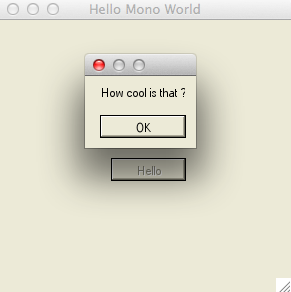
blog comments powered by Disqus